Drawing Ellipses
Here's the trick behind every curved eyebrow, every smiling mouth, and every eye in this book:
ellipse() can draw just one quarter of a shape at a time. Master that and you can build an
entire emotional range out of a single function.
1 | |
What Changed From the OLED Kit
The call now starts with shapes.ellipse(display, ...) instead of oled.ellipse(...), and the
reason is worth knowing: the GC9A01 driver has no ellipse at all.
framebuf's version was compiled into the MicroPython firmware, in C, for free. This driver is not
built on framebuf, so shapes.py rebuilds the missing commands in about 200 lines of readable
MicroPython. You can open the file and read the whole thing — one of the lines in it is the ellipse
equation you already know from math class.
| OLED kit | This kit | |
|---|---|---|
| Where the code lives | Compiled into the firmware | lib/shapes.py, in MicroPython |
| How you call it | oled.ellipse(...) |
shapes.ellipse(display, ...) |
| Can you read it? | No | Yes — and you should |
| How it fills | Pixel runs inside C | One hline() per row |
The Quadrant Fill Codes
The optional quad_code restricts drawing to one or more quarters of the ellipse. Add the numbers
together to combine quarters. These are the same numbers the OLED used, and they still mean the
same thing:
| Code | Quarter | Add them for |
|---|---|---|
| 1 | Top-right | 3 = top half — a frown |
| 2 | Top-left | 12 = bottom half — a smile |
| 4 | Bottom-left | 6 = left half |
| 8 | Bottom-right | 9 = right half |
Two Characters Apart, Opposite Feelings
 Mask 3 is the frown. Mask 12 is the smile. That is the entire difference between a robot that looks pleased to see you and one that looks disappointed in you — and the Five Broken Faces lab plants that exact bug on purpose.
Sample Program Code
One plain filled ellipse for reference, then all four half-codes drawn as outlines so each arc stands on its own.
1 2 3 4 5 6 7 8 9 10 11 12 13 14 15 16 17 18 19 20 21 22 23 24 25 26 27 28 29 30 31 32 33 | |
Here's what that program draws on the display:
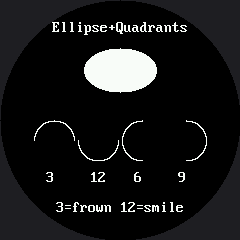
Read that row left to right. Code 3 curves like a frown, code 12 curves like a smile, and codes 6 and 9 are the left and right halves you will use for a smirk.
Thicken Every Curve
 A one-pixel arc on a 240-pixel screen reads as a scratch, not a mouth. Every face in this kit draws its curves four times, one pixel apart — look for
 for offset in range(STROKE) in the face labs.
Things to Try
- Turn the frown into a smile. Change the first quadrant code from 3 to 12 and watch the arc flip. Two characters, opposite mood.
- Read the source. Open
lib/shapes.pyand find the loop insideellipse(). It walks one row at a time and draws a horizontal run. That single design decision is worth about 10x, and the How Fast Is a Face? lab measures it. - Make it slow on purpose. Change the fill branch in
shapes.pyto usedisplay.pixel()in a loop and run this lab again. Same picture, visibly slower — you just found where the speed lives. - Combine three quarters. What does code 7 draw? Predict before you run it.
References
- Drawing Circles — the special case where both radii are equal
- The Emotion Table — where the quadrant code becomes one column of a data table
- Five Broken Faces — the inverted-mask bug, planted on purpose