The Face Module
Open the expression menu and the live tuning lab side by side. Both define a function that draws an eye. Both define one that draws an eyebrow. Both define a mouth. The definitions are nearly identical, and every program you have written that draws a face has been carrying its own private copy.
That duplication is about to become a superpower, because getting rid of it is the single highest-leverage move in programming.
Time to clean up the workshop
 You already know how to draw every part of my face. This lesson is about writing it down once, in one place, so you never have to write it again. Every pixel tells a story!
Two Ideas With Real Names
This lab does not teach a single new drawing command. It teaches two ways of thinking that computer scientists named a long time ago, because they matter that much.
Decomposition means breaking a problem into parts small enough to name. A face is not one thing you draw — it is eyes, plus eyebrows, plus a mouth. Once each part has a name, you can work on one without holding the other two in your head.
Abstraction means hiding how a part works behind what it is called. After this lab you will
write face.eyes(24, 24) and stop thinking about ellipses entirely. The ellipse is still there;
you just do not have to look at it anymore.
| Idea | The question it answers | What it looks like in code |
|---|---|---|
| Decomposition | What are the pieces? | Separate functions for eyes, eyebrows, and mouth |
| Abstraction | What do I call this piece, and what can I forget? | face.eyes(24, 24) instead of four shapes.ellipse() calls |
Where the Facts Live Now
Your kit already had one shared file, config.py, holding the hardware facts — which pin the
clock is on, how many pixels wide the screen is, where the circle's center sits.
face.py does the same job for the face facts: how far apart the eyes sit, how long an eyebrow
is, how to draw each style of mouth, and what color it all draws in.
| File | What it knows | Lives at |
|---|---|---|
config.py |
Pins, screen size, circle geometry | The kit root |
face.py |
Eye spacing, brow length, mouth styles, colors | The kit root |
lib/shapes.py |
Generic geometry — ellipse, poly, ring | lib/ |
That split is about what each file knows. config.py and face.py describe this kit.
shapes.py never mentions the kit at all, which is why it lives in lib/ and why it moved to a
second round-display kit unchanged.
Three Expressions in Nine Lines
Here is the payoff. The expression menu spends about 70 lines defining face parts before it draws
anything. With face.py doing that work, three complete expressions take nine.
1 2 3 4 5 6 7 8 9 10 11 12 13 14 15 16 17 18 19 20 21 22 23 24 25 26 27 28 29 30 31 32 33 34 35 36 37 38 39 40 41 42 43 44 | |
Here's the first expression in the cycle:
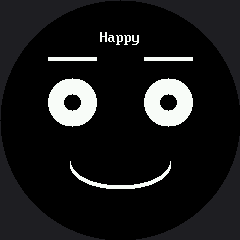
Notice What Is Missing
There is no show() call in that show() function. There is not one on this display at all.
face.clear() paints black, the drawing calls go straight to the glass, and that is the entire
cycle.
Compare the two kits and you can see the abstraction absorbing a hardware difference:
OLED kit's face.py |
This kit's face.py |
|
|---|---|---|
| Draw a shape | Pokes bits in a RAM buffer | Sends bytes over SPI |
| End of a frame | oled.show() — required |
Nothing — already on the glass |
| Erase | oled.fill(0), essentially free |
face.erase(x, y, w, h), sized to the change |
| What the lab code looks like | face.eyes(10, 10) |
face.eyes(24, 24) |
The last row is the point. Two different displays, two very different drivers, and the lab code is the same shape either way. That is what abstraction is for.
Moved, Not Rewritten
 Refactoring means changing how code is organized without changing what it does. If my face looks different after this lab, something went wrong — a clean refactor is invisible from the outside.
One Mouth Function Instead of Six
Faces need more than one kind of mouth, and face.py gives you one function plus a style name
that picks the shape:
1 2 3 4 5 6 7 8 9 10 | |
That single function is what makes the next lab possible. Because the mouth style is now a value you can pass around, an entire expression can be written as a row of data instead of a block of code.
The Trade You Are Making
Abstraction is not free, and pretending otherwise would be dishonest. When you hide the
shapes.ellipse() calls behind face.eyes(), you hide them from yourself too. A beginner reading
your program can no longer see how an eye is drawn without opening a second file.
That trade is almost always worth it, and here is the rule of thumb: hide a detail once you have written it correctly three times. Before then, writing it out teaches you something. After then, writing it out just gives you three places to make the same typo.
Before face.py |
After face.py |
|---|---|
Every program has its own draw_eye() |
One copy, in one file |
| Fixing an eyebrow means editing 8 programs | Fixing an eyebrow means editing 1 file |
You can see the ellipse() call right there |
You have to open face.py to see it |
| New expression: copy 70 lines, then edit | New expression: 3 lines |
One file to rule them all
 Your face parts now live in one place, which means every program you write from here on starts with a face already built. Great expression!
Things to Try
- Add a fourth expression. You should not need to write a single
shapes.ellipse()call — onlyface.eyes(),face.eyebrows(), andface.mouth()with different numbers. - Change
face.EYE_SPACINGfrom 48 to 60 and run again. One edit just moved the eyes on every expression at once. (Go too far and they start hitting the bezel, which is the round screen reminding you it has opinions.) - Break it on purpose. Set
face.EYE_Yto 220. Because every expression shares one definition, every expression breaks the same way — which is exactly what makes the bug easy to find. - Compare file sizes. This lab against lab 19: same three expressions, a fifth of the code, and every number you can still see is a number about feeling rather than about pixels.
References
- The Expression Menu — the duplicated drawing code this lab consolidates
- The Emotion Table — what becomes possible once a mouth style is a value
- Your First Face — where the eye spacing and mouth position numbers came from