AAA Pipeline with Non-Repudiation Sidebar
You can include this MicroSim on your own page with the following iframe:
<iframe src="https://dmccreary.github.io/cybersecurity/sims/aaa-pipeline/main.html" height="352" width="100%" scrolling="no"></iframe>
About this MicroSim
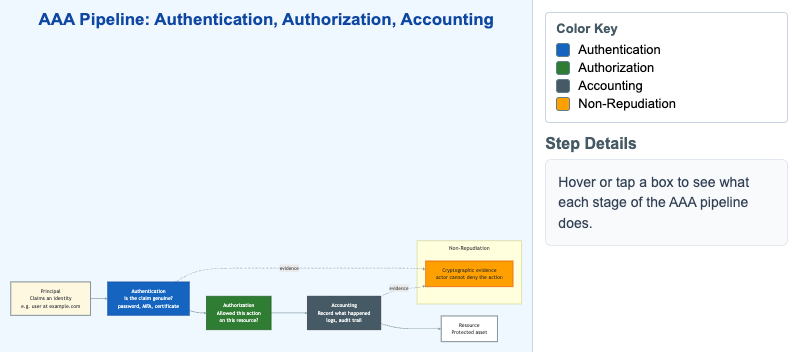
This diagram traces the AAA pipeline — Authentication, Authorization, and Accounting — the backbone of access control. A Principal claims an identity; Authentication verifies that claim; Authorization decides whether that verified principal may take a specific action on a specific Resource; and Accounting records what happened. The amber Non-Repudiation sidebar shows how cryptographic evidence drawn from authentication and accounting binds an actor to an action so it cannot later be denied.
Hover over (or tap, on a touch screen) any box to reveal a one-paragraph definition of that stage in the right-hand panel. The color key separates the four functions at a glance: blue for authentication, green for authorization, slate for accounting, and amber for non-repudiation. The layout reflows to a single vertical column on narrow screens so it remains readable on a phone.
Lesson Plan
Learning objective (Bloom: Understand). Students will distinguish authentication, authorization, and accounting, and explain how each stage of the AAA pipeline contributes to controlling and recording access to a protected resource.
Suggested classroom use. Project the diagram and have students hover each stage in turn while you ask them to predict the definition before it appears. Then have pairs walk a concrete scenario — an employee opening a payroll record — through all five boxes, naming what is checked at each step.
Discussion questions:
- A system lets a verified user read a file they are not permitted to open. Which AAA stage failed — and why is authentication alone not enough?
- If accounting logs are deleted or never written, what specifically becomes impossible to prove? Connect your answer to non-repudiation.
- Where would multi-factor authentication change the diagram, and which stage does it strengthen?
References
- Authentication, authorization, and accounting (AAA) — Wikipedia
- Non-repudiation — Wikipedia
- Authorization — Wikipedia
- NIST Glossary: Authentication
Specification
The full specification below is extracted from Chapter 1: "Security Foundations: Properties, Mindset, and Risk".
Type: workflow-diagram
sim-id: aaa-pipeline
Library: Mermaid
Status: Specified

A horizontal flow diagram with four boxes connected by arrows:

1. Principal (left) - "Claims an identity (e.g., user@example.com)"
2. Authentication - "Is the claim genuine? (password, MFA, certificate)"
3. Authorization - "Is this principal allowed this action on this resource?"
4. Accounting - "Record what happened (logs, audit trail)"
5. Resource (right) - "Protected asset"

Below the main flow, a side-box labeled Non-Repudiation with arrows from
"Authentication" and "Accounting" feeding into it, with the caption
"Cryptographic evidence — actor cannot deny the action."

Each step is color-coded: authentication = blue (#1565c0), authorization =
green, accounting = slate-steel (#455a64), non-repudiation = amber (#ffa000).
Clicking each step expands a definition tooltip. Responsive: stacks vertically
on screens under 700px wide.

Implementation: Mermaid graph LR with subgraph for non-repudiation sidebar.