ICS Attack Path Explorer
You can include this MicroSim on your own page with the following iframe:
<iframe src="https://dmccreary.github.io/cybersecurity/sims/ics-attack-path-explorer/main.html" height="607" width="100%" scrolling="no"></iframe>
About this MicroSim
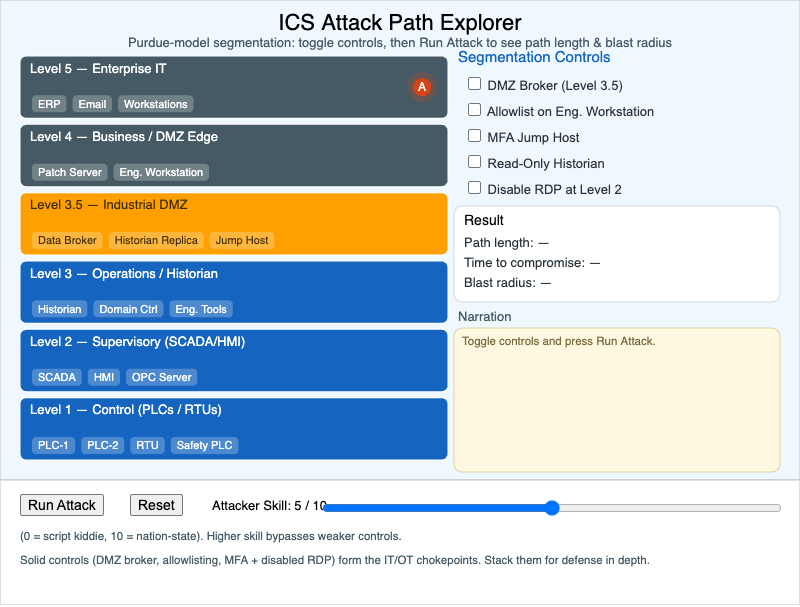
The left side of the canvas is a six-band Purdue-model network, drawn top to bottom from Level 5 (Enterprise IT) down to Level 1 (Control / PLCs), with the Industrial DMZ (Level 3.5) highlighted in alert orange. A red attacker token starts at Level 5 — the foothold an attacker most often gets first. Your job is to keep that token from reaching the programmable logic controllers at the bottom, where it could disrupt a physical process.
On the right is a panel of five segmentation controls you can toggle: a DMZ broker, application allowlisting on the engineering workstation, an MFA jump host, a read-only historian, and disabling RDP at Level 2. An Attacker Skill slider (0–10) sets how likely the adversary is to bypass a weaker control. Press Run Attack to animate the descent; the panel then reports the path length (hops), the time to compromise, and the blast radius (how many Level-1 devices the attacker can reach), and the narration log explains why each control held or failed.
With no defenses, a moderately skilled attacker reaches the PLCs in only a few hops. Stacking controls forces detours, adds hours, and — when the right chokepoints are in place — contains the attacker entirely in the IT layer. Move the mouse over the canvas while a run is in progress to watch the token travel.
Lesson Plan
Learning objective (Bloom: Apply → Analyze). Given a Purdue-model network with an attacker at Level 5, students will place segmentation controls and analyze the resulting attack path length and blast radius, reasoning about which controls form the load-bearing IT/OT chokepoints.
Suggested classroom use. Have students first run the attack with no defenses and record the baseline path length, time, and blast radius. Then challenge them to find the smallest set of controls that fully contains the attacker at Attacker Skill 5, and again at Attacker Skill 10. Discuss why the answer changes with adversary skill.
Discussion questions:
- Why does the DMZ broker at the IT/OT boundary contain a low-skill attacker so much more effectively than controls deeper in the OT network?
- The read-only historian never fully blocks the attacker, yet it shrinks the blast radius. What real defensive principle does that illustrate?
- At Attacker Skill 10, single controls leak. Which combination still contains the attacker, and why does layering matter against a capable adversary?
References
- Purdue Enterprise Reference Architecture — Wikipedia
- Industrial control system — Wikipedia
- Defense in depth (computing) — Wikipedia
- Network segmentation — Wikipedia
Specification
The full specification below is extracted from Chapter 14: "Societal Security: Law, Forensics, and Ethics".
Type: microsim
sim-id: ics-attack-path-explorer
Library: p5.js
Status: Specified

Learning objective (Bloom: Apply -> Analyze): Given a Purdue-model network with an
attacker at Level 5, the student places segmentation controls (firewall, DMZ
broker, allowlisting, MFA jump host) and observes the resulting attack path length
and blast radius.

Layout: a vertical six-band Purdue stack (Levels 0-5) with colored device nodes;
a control panel with checkbox toggles for each defense; a Run Attack button that
animates a red attacker token from Level 5 toward the Level 1 PLCs; an Attacker
Skill slider (0-10); and a live readout of path length, time to compromise, and
blast radius, plus a narration log.

Behavior: with no defenses the attacker reaches the PLCs in ~3 hops; each toggled
defense adds hops, time, or blocks the path entirely, with narration explaining
why. At maximum defenses the attacker is contained in the IT layer.

Color: cybersecurity blue for OT, slate steel for IT, alert orange for the DMZ,
red token for the attacker. Responsive via updateCanvasSize().