Anatomy of an X.509 Certificate
You can include this MicroSim on your own website with the following iframe:
<iframe src="https://dmccreary.github.io/cybersecurity/sims/x509-anatomy/main.html" height="687" width="100%" scrolling="no"></iframe>
About this MicroSim
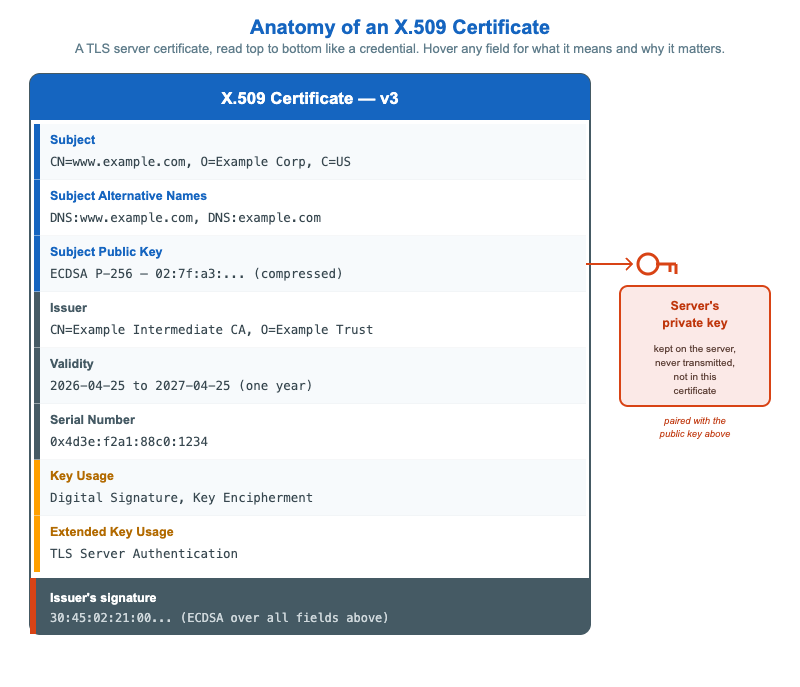
This infographic takes the X.509 certificate your browser checks on every HTTPS connection and lays it out like a physical credential you can read top to bottom. A blue header band names the format (X.509 v3), and eight fields follow: Subject (the identity being authenticated), Subject Alternative Names (the hostnames the certificate actually covers), Subject Public Key (the key being bound to that identity), Issuer (the CA that signed it), Validity (the expiry window), Serial Number (the handle used in revocation), Key Usage, and Extended Key Usage (which together restrict what the key may do). A slate-steel footer band shows the issuer's signature over everything above it. On the right, a rust-orange key icon links the Subject Public Key field to a callout for the server's private key — the half of the pair that never appears in the certificate and is never transmitted. Hover (or tap) any field for a plain-language explanation of what it means and why a browser checks it. The MicroSim is a static SVG with hover reveals, so you set the pace.
Lesson Plan
Learning objective: Students can identify the eight core fields of an X.509 v3 TLS server certificate, explain what each field is for and why a browser checks it, and distinguish the certificate's public key from the server's private key.
Suggested classroom use: Display the certificate and, before revealing any tooltips, ask students to guess what each field name means. Reveal the tooltips to check. Then run a "what breaks?" round: for each field, ask what attack or failure becomes possible if a browser ignores it (skip SAN → wrong-host acceptance; skip Validity → no expiry; skip EKU → a code-signing cert used for HTTPS). Finish with the key-icon callout to make the public/private split concrete.
Discussion questions:
- Why do modern browsers ignore the Common Name and require a Subject Alternative Name?
- The certificate is sent in the clear to every visitor. Why is that safe, and what is the one piece that must stay secret?
- How do the Issuer field and the footer signature work together to let a browser verify the chain back to a trusted root?
Specification
The full specification below is extracted from Chapter 4: "Cryptography in Practice: PKI, TLS, and Data Protection".
Type: infographic-svg
**sim-id:** x509-anatomy<br/>
**Library:** Static SVG with hover tooltips<br/>
**Status:** Specified

A vertical document layout styled like a physical credential, with hover tooltips on each field explaining its meaning.

Header band (cybersecurity blue #1565c0, white text): "X.509 Certificate v3"

Body fields (each with hover tooltip):

1. **Subject:** CN=www.example.com, O=Example Corp, C=US
   - Tooltip: "Identity this certificate authenticates. Browsers match the URL hostname against this field."
2. **Subject Alternative Names:** DNS:www.example.com, DNS:example.com
   - Tooltip: "Additional hostnames the certificate covers. Modern browsers require this; CN alone is ignored."
3. **Subject Public Key:** ECDSA P-256 (compressed point shown)
   - Tooltip: "The public key being bound to the subject. The corresponding private key lives on the server."
4. **Issuer:** CN=Example Intermediate CA, O=Example Trust Services
   - Tooltip: "The CA that signed this certificate. Look up the issuer's certificate to verify the chain."
5. **Validity:** 2026-04-25 to 2027-04-25 (one year)
   - Tooltip: "Certificates expire. Short validity reduces the window during which a compromised certificate can be misused."
6. **Serial Number:** 0x4d3e:f2a1:88c0:1234
   - Tooltip: "Unique identifier within the issuer. Used in revocation lists to point at a specific certificate."
7. **Key Usage:** Digital Signature, Key Encipherment
   - Tooltip: "Restricts what the key may be used for. A TLS server certificate cannot be used as a code-signing certificate."
8. **Extended Key Usage:** TLS Server Authentication
   - Tooltip: "Further narrows the role. Browsers reject certificates without this EKU for HTTPS."

Footer band (slate steel #455a64, white text): "Issuer's signature: 30:45:02:21:00... (ECDSA over all fields above)"

A small key-icon graphic on the right side links the "Subject Public Key" field to a "Server's private key (kept on the server, never transmitted)" callout.

Color: cybersecurity blue, slate steel, white, with rust orange accent on the signature footer. Responsive: scales to viewport width; tooltips collapse to expand-on-tap on mobile.

Implementation: Static SVG with embedded CSS hover styles and accessible tooltips.
References
- X.509 — Wikipedia
- Public key certificate — Wikipedia
- Subject Alternative Name — Wikipedia
- Public key infrastructure — Wikipedia