Network Security as Layered Defense
Run the Network Defense Layers MicroSim Fullscreen
You can include this MicroSim on your own website with the following iframe:
<iframe src="https://dmccreary.github.io/cybersecurity/sims/network-defense-layers/main.html" height="622" width="100%" scrolling="no"></iframe>
About this MicroSim
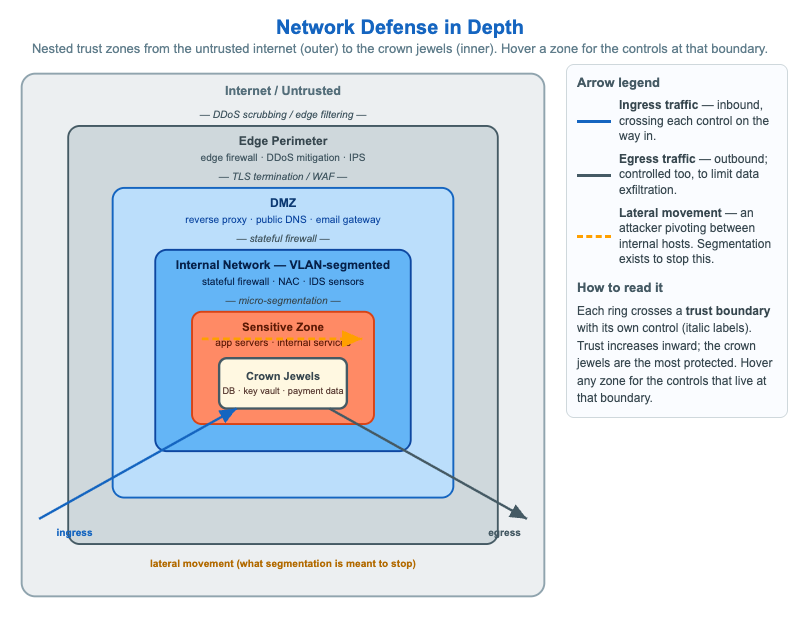
This infographic draws defense in depth as a set of nested trust zones, from the untrusted internet on the outside to the crown jewels — databases, key vaults, payment data — at the very center. Between the two sit the edge perimeter (edge firewall, DDoS mitigation, IPS), the DMZ (the internet- facing reverse proxy, public DNS, and email gateway), the VLAN-segmented internal network, and a sensitive zone of application servers. Trust increases as you move inward, and every ring represents a layer an attacker must defeat to reach the next.
The italic labels between rings name the control that crosses each trust boundary — DDoS scrubbing, TLS termination and a WAF, a stateful firewall, and micro-segmentation — so you can see that a boundary is not just a line but a specific enforcement point. The legend distinguishes three traffic patterns: ingress (inbound, filtered on the way in), egress (outbound, also controlled to limit data exfiltration), and the amber dashed lateral movement arrow — an attacker pivoting between internal hosts, which is exactly what segmentation is meant to stop. Hover any zone to see the controls that live at that boundary. The layout collapses to a single column on narrow screens.
Lesson Plan
Learning objective (Bloom — Understand): Students can identify the nested network trust zones from the untrusted internet to the crown-jewel data store and name the control that typically crosses each trust boundary.
Suggested classroom use: Hover each ring from outer to inner and have students narrate what an attacker would have to defeat at each step. Then trace the lateral- movement arrow and discuss why "assume breach" makes internal segmentation worthwhile even behind a strong perimeter.
Discussion questions:
- Why is the DMZ kept separate from the internal network even though both are owned by the same organization?
- An attacker already has a foothold on one internal host. What does VLAN micro-segmentation cost them, and why is that valuable to a defender?
- Why control egress traffic at all — isn't the danger coming in?
References
- Defense in depth (computing) (Wikipedia)
- DMZ (computing) (Wikipedia)
- Network segmentation (Wikipedia)
Specification
The full specification below is extracted from Chapter 8: "Network Security Foundations: Protocols, Firewalls, and Detection".
Type: infographic-svg
**sim-id:** network-defense-layers<br/>
**Library:** Static SVG with hover tooltips<br/>
**Status:** Specified

A series of concentric ring shapes (or nested rectangles) representing defensive layers, drawn from outer (internet) to inner (crown-jewel data store):

- **Outermost ring (gray):** "Internet / Untrusted" — adversaries, scanning traffic, DDoS sources
- **Ring 2 (slate):** "Edge perimeter" — labeled controls: edge firewall, DDoS mitigation, IPS
- **Ring 3 (cybersecurity blue):** "DMZ" — labeled hosts: web/reverse proxy, public DNS, email gateway
- **Ring 4 (deeper blue):** "Internal network / VLAN-segmented" — labeled controls: stateful firewall, NAC, IDS sensors
- **Ring 5 (warm orange):** "Sensitive zone" — labeled hosts: application servers, internal services
- **Innermost (cream):** "Crown jewels" — database servers, key vaults, payment data

Between each ring, draw a small "trust boundary" indicator (dashed line) labeled with the typical control crossing that boundary (e.g., "TLS termination", "WAF", "stateful firewall", "micro-segmentation").

To the right of the rings, a small legend distinguishes:

- Solid arrow inward = "ingress traffic"
- Solid arrow outward = "egress traffic"
- Red dashed arrow = "lateral movement (what segmentation is meant to stop)"

Color palette: cybersecurity blue (#1565c0) for trusted controls, slate steel (#455a64) for boundaries, amber (#ffa000) for the lateral-movement warning arrow, fur orange (#d84315) for the sensitive zone callout.

Interaction: hover on each ring shows a tooltip listing the controls that typically live at that boundary. Responsive: collapses to a vertical stack of labeled tiles below 700px viewport. The diagram must respond to window resize events.

Implementation: Static SVG with `<title>` tooltips per ring; alternatively a small p5.js sketch if simple animations (highlighting one boundary on click) are desired.