OSI vs. TCP/IP Models
You can include this MicroSim on your own page with the following iframe:
<iframe src="https://dmccreary.github.io/cybersecurity/sims/osi-vs-tcpip/main.html" height="502" width="100%" scrolling="no"></iframe>
About this MicroSim
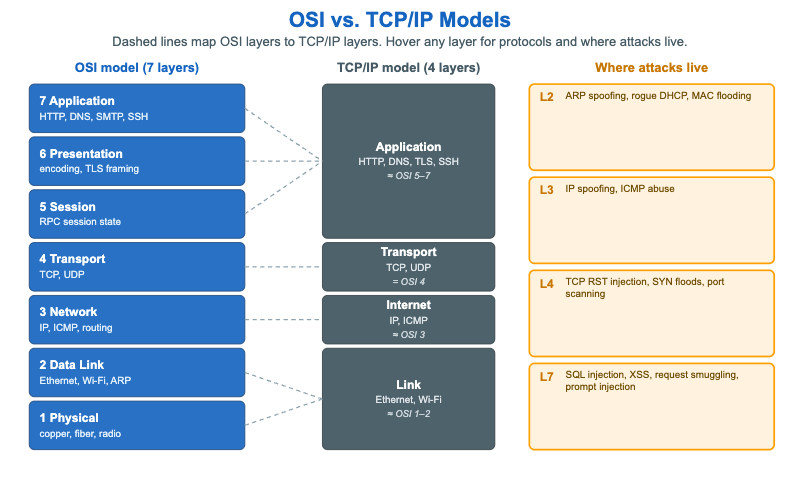
This side-by-side compares the two network models every practitioner switches between. The left column is the 7-layer OSI model, drawn with Application at the top and Physical at the bottom; the center column is the 4-layer TCP/IP model that real networks actually run. Dashed lines connect each OSI layer to the TCP/IP layer that absorbs it — most visibly, TCP/IP's single Application layer spans OSI layers 5, 6, and 7, and its Link layer spans OSI layers 1 and 2.
Each layer in both columns lists example protocols (HTTP and DNS at the top; IP and ICMP in the middle; Ethernet and Wi-Fi at the bottom). Hover or tap any layer for a tooltip naming the protocols and one example security control that operates there — for instance, stateful firewalls at the Transport layer and dynamic ARP inspection at the Link layer.
The far-right column anchors the models to security practice: it shows where attacks live. ARP spoofing and rogue DHCP are L2 problems; IP spoofing and ICMP abuse are L3; SYN floods and port scanning are L4; and SQL injection, XSS, and prompt injection are L7. Mapping an attack to its layer is the first step toward choosing a control that can actually see and stop it.
Lesson Plan
Learning objective (Bloom: Understand). Students will map each OSI layer to its TCP/IP counterpart, identify example protocols at each layer, and associate common attacks with the layer they target.
Suggested classroom use. Call out a protocol or an attack ("SYN flood", "Ethernet", "SQL injection") and have students point to the correct layer in both models and name the matching defensive control from the tooltip.
Discussion questions:
- Why does the TCP/IP model collapse OSI layers 5, 6, and 7 into a single application layer? What does that say about how those layers behave in practice?
- TLS is sometimes described as layer 6 and sometimes as part of the application layer. Why is its placement ambiguous, and does the ambiguity matter operationally?
- Why does knowing an attack's layer help you pick a control? Give an example where a control at the wrong layer cannot see the attack.
References
- OSI model — Wikipedia
- Internet protocol suite — Wikipedia
- Communication protocol — Wikipedia
- Network security — Wikipedia
Specification
The full specification below is extracted from Chapter 8: "Network Security Foundations: Protocols, Firewalls, and Detection".
Type: infographic-svg
sim-id: osi-vs-tcpip
Library: Static SVG with hover tooltips
Status: Specified

A two-column visual. Left: the 7-layer OSI model (Physical, Data Link, Network,
Transport, Session, Presentation, Application). Right-center: the 4-layer TCP/IP
model (Link ≈ OSI 1+2, Internet ≈ OSI 3, Transport = OSI 4, Application ≈ OSI 5+6+7).
Dashed lines map OSI layers to TCP/IP layers, and each cell lists example protocols.

To the right, a "where attacks live" annotation: L2 (ARP spoofing, rogue DHCP, MAC
flooding), L3 (IP spoofing, ICMP abuse), L4 (TCP RST injection, SYN floods, port
scanning), L7 (SQL injection, XSS, request smuggling, prompt injection).

Per-layer hover tooltips show example protocols and an example control (e.g. L4:
"stateful firewalls operate here"). Color: cybersecurity blue OSI column, slate
TCP/IP column, amber attack callouts. Responsive: the SVG scales to its container.