Adversarial Example Explorer
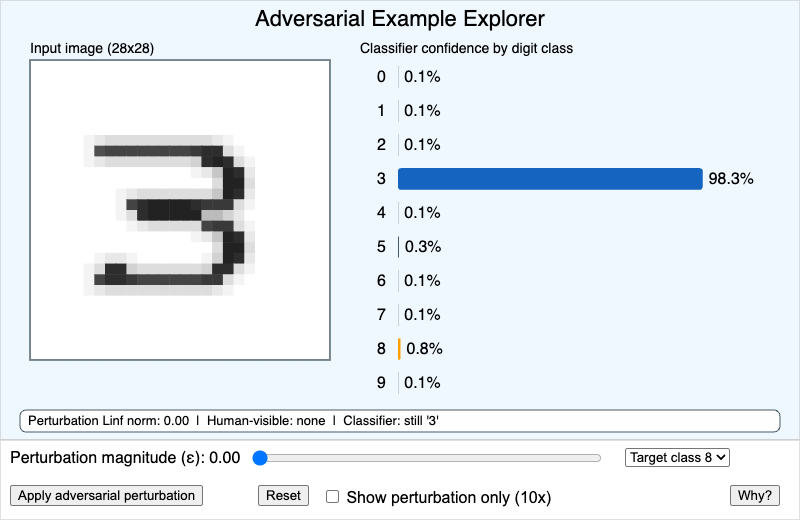
Run the Adversarial Example Explorer MicroSim Fullscreen
You can include this MicroSim on your own website with the following iframe:
<iframe src="https://dmccreary.github.io/cybersecurity/sims/adversarial-example-explorer/main.html" height="522" width="100%" scrolling="no"></iframe>
About this MicroSim
This MicroSim shows how a machine-learning classifier can be fooled by a change that a human can barely see. On the left is a 28×28 grayscale digit that reads clearly as a 3; on the right is a live bar chart of the classifier's confidence across all ten digit classes. By default the model is confident the input is a 3.
Drag the Perturbation magnitude (ε) slider and the simulation recomputes a Fast Gradient Sign Method (FGSM) perturbation toward the target class you pick from the dropdown. At small ε the bars barely move; past a threshold the target-class bar (shown in alert orange) overtakes the correct-class bar (blue), even though the picture still looks like a 3. Click Apply adversarial perturbation to latch the current magnitude, toggle Show perturbation only (10×) to see how small the added noise really is, and use Reset to restore the clean digit. The Why? button reveals the gradient intuition behind the attack. The annotation bar reports the perturbation's L∞ norm, its human visibility, and the classifier's current verdict.
Lesson Plan
Learning objective (Bloom — Analyze): Students can explain why a model's decision boundary admits adversarial examples by manipulating an input and watching the classifier's confidence change.
Suggested classroom use: Open with the clean digit and confirm the class is confidently "3." Ask students to predict at what ε the prediction will flip, then have them slide up to find the real threshold. Switch on Show perturbation only and discuss the gap between human perception and model sensitivity. Tie the result to real evasion attacks on spam filters, malware classifiers, and vision systems in safety-critical settings.
Discussion questions:
- The digit still looks like a 3 to you, yet the model reads it as an 8. What does that tell you about where the model's decision boundary actually sits?
- The attack here bounds the change with an L∞ norm. Why is bounding the maximum per-pixel change a good proxy for "imperceptible to a human"?
- If you were defending this classifier, would you rather detect the perturbation, retrain against it, or refuse low-confidence inputs — and what is the blast radius of each choice?
References
- Adversarial machine learning (Wikipedia)
- Goodfellow, Shlens, Szegedy — Explaining and Harnessing Adversarial Examples (FGSM, 2015)
- NIST AI 100-2: Adversarial Machine Learning — A Taxonomy
Specification
The full specification below is extracted from Chapter 16: "Emerging Topics and Capstone Pathways".
Type: microsim
**sim-id:** adversarial-example-explorer<br/>
**Library:** p5.js<br/>
**Status:** Specified

**Learning objective (Bloom — Analyzing):** Students can explain why a model's decision boundary admits adversarial examples by manipulating an input and watching the classifier's confidence change.

**Canvas:** 800×500, responsive (uses `updateCanvasSize()` in setup, parents to `<main>`).

**Visual:**

- Left panel (400×400): a 28×28 grayscale "digit" canvas with a hand-drawn-looking 3.
- Right panel: a horizontal bar chart of 10 confidence scores (one per digit class), updated live.
- Below the digit: two p5.js sliders — **Perturbation magnitude** (0.0 to 0.3, step 0.01) and **Target class** (0–9 select dropdown).
- A p5.js button: **"Apply adversarial perturbation"** that runs a one-step gradient-sign attack and overlays the noise on the digit.
- A p5.js checkbox: **"Show perturbation only"** that displays only the noise pattern, with a 10× magnification, so students can see how visually small the change is.

**Behavior:**

- Default state: digit is correctly classified as "3" with ~95% confidence.
- When the user selects target class "8" and increases perturbation magnitude, the perturbation is recomputed each frame.
- At low magnitude the bars barely move; past a threshold the "8" bar overtakes the "3" bar — even though the displayed digit still looks like a 3 to a human.
- A small annotation appears: "Perturbation L∞ norm: 0.08. Human-visible: barely. Classifier: confident '8'."

**Pedagogical hook:** A reset button restores the original digit. A "Why?" link below the canvas reveals two sentences about the gradient direction of the loss with respect to the input.

Color: cybersecurity blue #1565c0 for confident-and-correct bars, alert accent #ffa000 for the adversarial-target bar, slate steel #455a64 for non-target bars.

Responsive: below 700px the panels stack vertically, controls remain reachable.

Implementation: p5.js with a small precomputed gradient matrix (no live model training needed). The gradient sign vector is hardcoded for two demonstration target classes.