Attack Surface, Trust Boundary, and Blast Radius
Run the Attack Surface / Trust Boundary / Blast Radius MicroSim Fullscreen
You can include this MicroSim on your own website with the following iframe:
<iframe src="https://dmccreary.github.io/cybersecurity/sims/surface-boundary-blast-radius/main.html" height="522" width="100%" scrolling="no"></iframe>
About this MicroSim
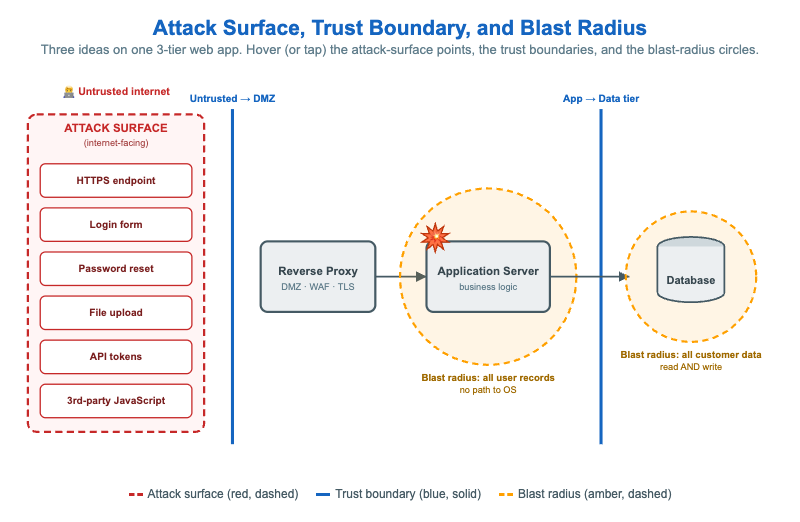
Students often blur three distinct security concepts together. This diagram pins them to one simple 3-tier web application so each can be seen separately.
The attack surface is the red dashed box on the internet side: every place an untrusted party can send input — the HTTPS endpoint, login form, password reset, file upload, API tokens, and third-party JavaScript. Each is a hover target with its own risk. The trust boundaries are the two solid blue lines: Untrusted → DMZ (between the internet and the reverse proxy) and App → Data tier (between the application server and the database) — the points where data crosses from a less-trusted zone into a more-trusted one and must be validated.
The blast radius is shown with two amber dashed circles. An explosion marks an assumed compromise of the application server; its circle reads "all user records, no path to OS" — containment matters. A second, separately sized circle around the database shows that stolen DB credentials reach all customer data, read and write. Hover (or tap) any element to read the detail. The lesson: attack surface asks where an attacker can poke, trust boundary asks where trust changes, and blast radius asks what one compromise reaches — three different questions about the same system. The SVG scales with the container.
Lesson Plan
Learning objective (Bloom — Understand): Students can distinguish attack surface, trust boundary, and blast radius, trace what a compromise of each tier reaches, and explain how boundaries and least privilege shrink blast radius.
Suggested classroom use: Walk the three concepts in order — hover all six attack-surface points, then both boundaries, then both blast circles — keeping them mentally separate. Then introduce controls (WAF, least-privilege DB creds, network segmentation) and ask which of the three each one changes.
Discussion questions:
- Why is the database's blast radius drawn differently from the app server's? What makes stolen DB credentials worse?
- Which single control most reduces attack surface, and which most reduces blast radius? Are they the same control?
- "Assume breach" means designing for the explosion already having happened. How does that mindset change where you spend effort?
References
- Attack surface (Wikipedia)
- Trust boundary (Wikipedia)
- Blast radius — privilege and containment (NIST glossary: least privilege)
Specification
The full specification below is extracted from Chapter 2: "Threats, Vulnerabilities, and Security Controls".
Type: architecture-diagram
**sim-id:** surface-boundary-blast-radius<br/>
**Library:** Mermaid (or static SVG)<br/>
**Status:** Specified

A simplified 3-tier web application diagram with:

- **Outer layer** (red, dashed): "Attack surface" — labeled with example points (HTTPS endpoint, login form, password reset, file upload, API tokens, third-party JavaScript)
- **First trust boundary** (between internet and reverse proxy): solid blue line labeled "Untrusted → DMZ"
- **Second trust boundary** (between application and database): solid blue line labeled "App → Data tier"
- **Internal components**: reverse proxy → application server → database
- A red explosion icon centered on the application server, with a dashed circle around it labeled "Blast radius if app is compromised: read all users' records, no path to OS"
- A second smaller blast-radius dashed circle centered on the database labeled "Blast radius if DB credentials are stolen: read/write all customer data"

Color palette: cybersecurity blue #1565c0 for trust boundaries, red #c62828 for attack-surface marks, slate steel #455a64 for component outlines, amber #ffa000 for the blast-radius dashed circles. Responsive layout.

Implementation: Mermaid graph LR with subgraphs for each tier; styling applied via Mermaid theme.