Security Control 3D Taxonomy
You can include this MicroSim on your own page with the following iframe:
<iframe src="https://dmccreary.github.io/cybersecurity/sims/control-taxonomy-cube/main.html" height="412" width="100%" scrolling="no"></iframe>
About this MicroSim
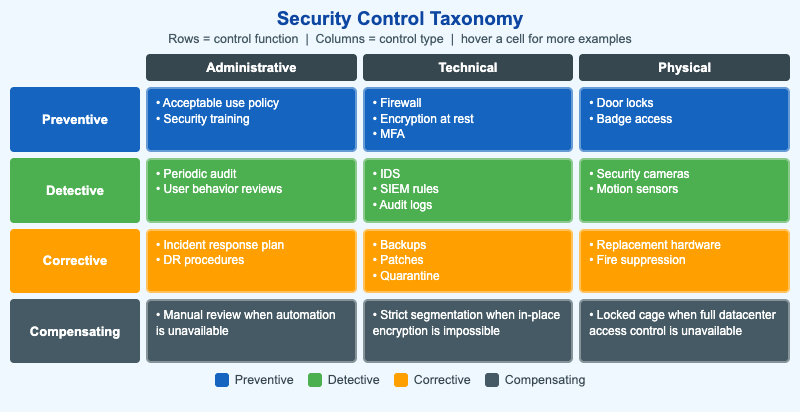
Security controls are usually described along two independent axes, and this grid shows both at once. The rows are the control's function: preventive (stop it happening), detective (notice it happening), corrective (recover after it happens), and compensating (a stand-in when the preferred control is not feasible). The columns are the control's type: administrative (policy and people), technical (technology), and physical.
Every one of the twelve cells holds one or two representative controls, color-coded by function. Hover over (or tap) any cell to reveal a fuller list of examples in a tooltip. The point is that the same security goal can be met with very different kinds of controls, and that a complete program needs all four functions across all three types — defense in depth.
On narrow screens the grid reflows into a single readable column so it works on a phone.
Lesson Plan
Learning objective (Bloom: Understand). Students will classify a given security control by both its function and its type, and give examples that fall in each of the twelve function-by-type combinations.
Suggested classroom use. Read a list of real controls aloud (e.g., "nightly backups", "a CCTV camera", "a written incident-response plan") and have students point to the cell each belongs in. Then challenge them to invent a compensating control for a system that cannot accept the normal preventive control.
Discussion questions:
- Why is a compensating control different from a corrective control? Give an example of each for the same risk.
- Pick a single threat (say, ransomware). Name one control from each of the four function rows that helps defend against it.
- Which cell is hardest to populate in your own organization, and what does that gap tell you about its security posture?
References
- Security controls — Wikipedia
- Defense in depth (computing) — Wikipedia
- NIST SP 800-53 (Security and Privacy Controls)
Specification
The full specification below is extracted from Chapter 2: "Threats, Vulnerabilities, and Security Controls".
Type: infographic-svg
sim-id: control-taxonomy-cube
Library: Static SVG with hover tooltips
Status: Specified

A 3x3 grid (or simplified 3D cube) where:
- Rows = Function: Preventive / Detective / Corrective / Compensating (4 rows)
- Columns = Type: Administrative / Technical / Physical (3 columns)

Each of the 12 cells contains 1-2 example controls. Cell coloring: each function
gets a color (preventive=blue, detective=green, corrective=amber,
compensating=slate). Hover tooltips reveal more examples per cell. Legend below
explains the colors.

Color: cybersecurity blue #1565c0 (preventive), green #4caf50 (detective), amber
#ffa000 (corrective), slate #455a64 (compensating). Responsive: rows stack to a
vertical list below 700px.

Implementation: Static SVG/HTML grid with hover tooltips per cell.