Hardware Trust Anchors on a Modern System
You can include this MicroSim on your own website with the following iframe:
<iframe src="https://dmccreary.github.io/cybersecurity/sims/trust-anchors-overview/main.html" height="692" width="100%" scrolling="no"></iframe>
About this MicroSim
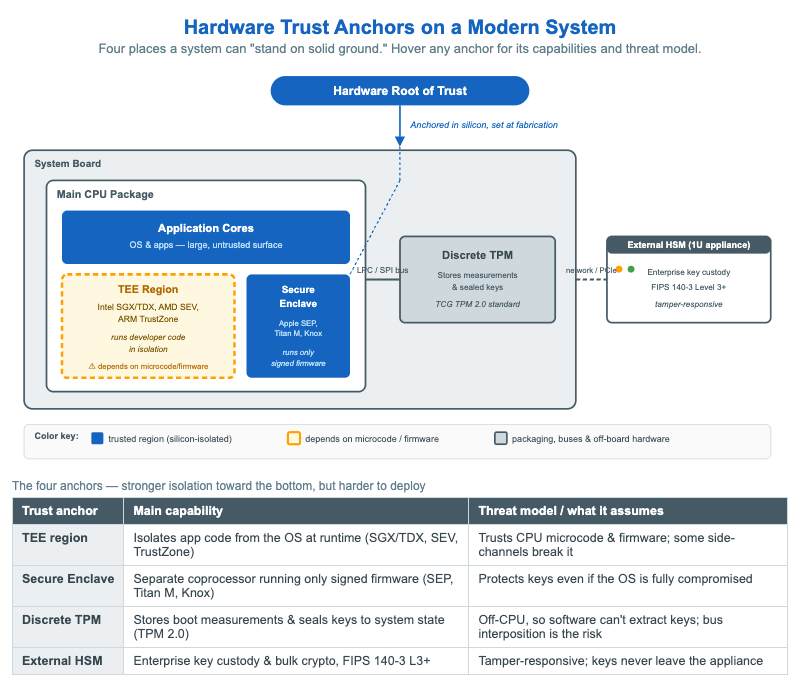
This infographic answers a deceptively simple question: when a system needs to trust something without proof, where does that trust physically live? It lays out a modern system board and highlights four hardware trust anchors. The TEE region (drawn with an amber outline because it depends on CPU microcode) isolates developer code at runtime — Intel SGX/TDX, AMD SEV, and ARM TrustZone. The Secure Enclave is a separate coprocessor on the same package that runs only signed firmware, as in Apple's SEP, Google's Titan M, and Samsung Knox. The discrete TPM is a standalone chip that stores boot measurements and seals keys, connected to the CPU over the LPC/SPI bus. The external HSM sits off the board entirely as a tamper-responsive appliance for enterprise key custody. A "Hardware Root of Trust" badge at the top points down into the package, reminding you that the whole chain is anchored in silicon at fabrication. Hover (or tap) any anchor to see its capability and threat model, and read the legend table below to compare all four at once.
Lesson Plan
Learning objective: Students can identify the four hardware trust anchors on a modern system, explain why a root of trust must be anchored in silicon rather than software, and compare the threat model of each anchor.
Suggested classroom use: Display the diagram and ask students to arrange the four anchors on a spectrum from "on-die" to "off-board," predicting the trade-off between isolation strength and deployment difficulty. Then reveal the tooltips to confirm. Pose a scenario — "the laptop's OS is fully compromised" — and have students reason about which anchors still protect a sealed key and which do not. Use the amber TEE outline to discuss why "isolated" is not the same as "unconditionally trusted."
Discussion questions:
- Why is the TEE region drawn with an amber outline instead of solid blue? What does that color choice say about its threat model?
- A discrete TPM and a Secure Enclave both protect keys. What does putting the TPM on a separate chip buy you, and what new attack does it open up?
- When would an organization deploy an external HSM even though it already has TPMs in every server?
Specification
The full specification below is extracted from Chapter 7: "Component and Hardware Security".
Type: infographic-svg
**sim-id:** trust-anchors-overview<br/>
**Library:** Static SVG with hover tooltips<br/>
**Status:** Specified

A horizontal layered diagram showing a modern computing system with four trust anchors highlighted.

Layout (left to right, on a single board):

1. **Main CPU package** (large central box, slate-steel border)
   - Inside: a smaller box labeled **Application cores** (cybersecurity blue)
   - Inside: a smaller box labeled **TEE region** (amber outline) with caption "Intel SGX / TDX / AMD SEV / ARM TrustZone — runs developer code in isolation"
   - On the same package: a small box labeled **Secure Enclave / Security coprocessor** (cybersecurity blue) with caption "Apple SEP, Google Titan M, Samsung Knox — runs only signed firmware"

2. **Discrete TPM chip** (smaller box on the board, slate-steel) connected by a thin line labeled "LPC / SPI bus" to the main CPU. Caption: "Stores measurements and sealed keys. Standardized command set."

3. **External HSM** (separate box outside the main board, drawn as a 1U appliance) connected via a network or PCIe icon. Caption: "Enterprise key custody. FIPS 140-3 Level 3+. Tamper-responsive."

Above the main CPU package, a "Hardware Root of Trust" badge points down into the secure enclave / TEE region with an arrow labeled "Anchored in silicon, set at fabrication."

Color: cybersecurity blue (#1565c0) for trusted regions, amber (#ffa000) outline on TEE to indicate "depends on microcode/firmware," slate steel (#455a64) for buses and packaging.

Hover tooltips on each anchor display its main capabilities and threat model from the table above.

Responsive: 4-column desktop layout collapses to vertical stack below 800px viewport.

Implementation: Static SVG with `<title>` tooltips per element.
References
- Trusted execution environment — Wikipedia
- Trusted Platform Module — Wikipedia
- Hardware security module — Wikipedia
- Apple Secure Enclave — Wikipedia