Shared Responsibility Across IaaS, PaaS, and SaaS
You can include this MicroSim on your own page with the following iframe:
<iframe src="https://dmccreary.github.io/cybersecurity/sims/shared-responsibility-stack/main.html" height="662" width="100%" scrolling="no"></iframe>
About this MicroSim
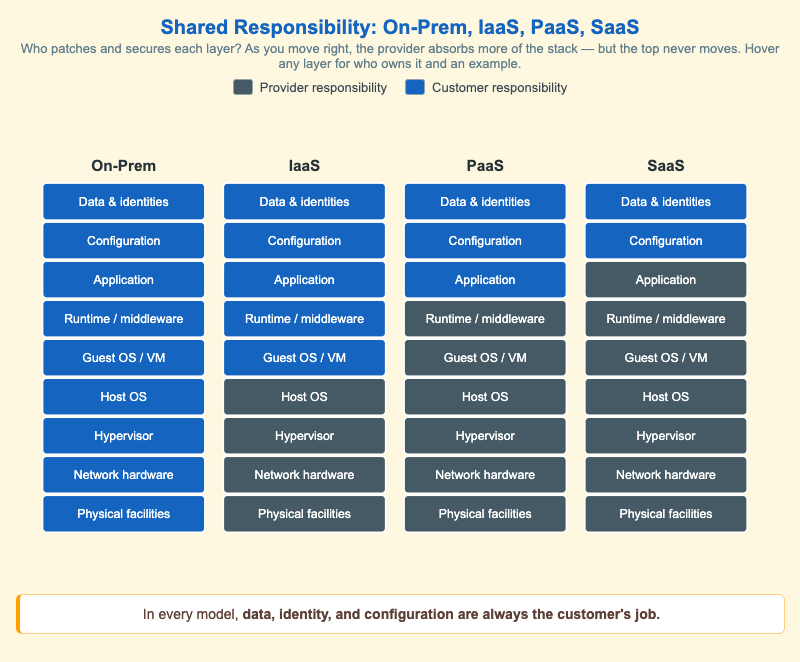
This infographic lays four deployment models side by side — On-Prem, IaaS, PaaS, and SaaS — and renders each as the same nine-layer stack, from physical facilities at the bottom to data and identities at the top. Every layer is colored by who is accountable for securing it: slate for the cloud provider and blue for the customer. Reading left to right, the slate region grows from the bottom up: On-Prem is entirely the customer's, IaaS hands the bottom four layers (physical, network, hypervisor, host OS) to the provider, PaaS adds the guest OS and runtime, and SaaS pushes the boundary up through the application itself.
The single most important pattern is what does not move. No matter how much of the stack the provider absorbs, the top layers — configuration, and data and identities — stay blue in every column. Moving to SaaS does not mean moving security off your plate; it means your remaining responsibilities are concentrated in exactly the layers attackers target most. Hover over (or tap, on a touch screen) any layer to see who owns it in that model plus a concrete example, such as enabling MFA in the Microsoft 365 admin center for the SaaS configuration layer. The cream caption restates the lesson the diagram is built to teach.
Lesson Plan
Learning objective (Bloom: Understand). Students will compare how responsibility for each layer shifts across On-Prem, IaaS, PaaS, and SaaS, and explain why data, identity, and configuration always remain the customer's job.
Suggested classroom use. Project the diagram and call out a sequence of concrete tasks — "patch the guest OS," "rotate a leaked API key," "apply a hypervisor CVE fix," "turn on MFA," "classify a dataset as PII." For each, have students name the column(s) in which it is the customer's responsibility. Close by asking what an organization that "lifted and shifted" to SaaS still has to do.
Discussion questions:
- A company moves email from a self-hosted server to a SaaS suite and assumes "the vendor handles security now." Using the diagram, list three things that are still entirely their responsibility.
- Why are configuration and identity the most attacked layers, and why is it significant that they are exactly the layers the provider never takes over?
- Two teams run the same workload — one on IaaS, one on PaaS. How does the set of layers they must patch and harden differ, and what does that imply about their respective attack surfaces?
References
- Cloud computing security — Wikipedia
- Cloud computing (service models: IaaS, PaaS, SaaS) — Wikipedia
- Shared responsibility model — AWS
- CSA Cloud Controls Matrix — Wikipedia
Specification
The full specification below is extracted from Chapter 11: "Cloud Security and Operations Monitoring".
Type: infographic-svg
sim-id: shared-responsibility-stack
Library: Static SVG with hover tooltips
Status: Specified

A four-column comparison. The leftmost column is "On-Prem" (legacy baseline). The next three are "IaaS", "PaaS", "SaaS". Each column is a vertical stack of nine layers, from bottom to top:

1. Physical facilities
2. Network hardware
3. Hypervisor
4. Host OS
5. Guest OS / VM
6. Runtime / middleware
7. Application
8. Configuration
9. Data and identities

Each layer is colored either slate-steel (#455a64) for "Provider responsibility" or cybersecurity-blue (#1565c0) for "Customer responsibility".

- On-Prem: all 9 layers customer-blue.
- IaaS: layers 1-4 provider-slate; layers 5-9 customer-blue.
- PaaS: layers 1-6 provider-slate; layers 7-9 customer-blue.
- SaaS: layers 1-7 provider-slate; layers 8-9 customer-blue.

A persistent caption at the bottom reads: "In every model, data, identity, and configuration are always the customer's job."

Hover tooltips on each layer briefly state who is responsible and give one concrete example (e.g. on the "Configuration" layer for SaaS: "Customer — e.g., enabling MFA in Microsoft 365 admin center").

Color: #1565c0 for customer layers, #455a64 for provider layers, #fff8e1 background. Responsive: columns reflow to two per row below 700px.

Implementation: Static SVG with hover tooltip per layer.