Hypervisor Architecture and the Trust Boundary
You can embed this MicroSim in your own course page with the following iframe:
<iframe src="https://dmccreary.github.io/cybersecurity/sims/hypervisor-architecture/main.html"
        width="100%" height="522" scrolling="no"></iframe>
About this MicroSim
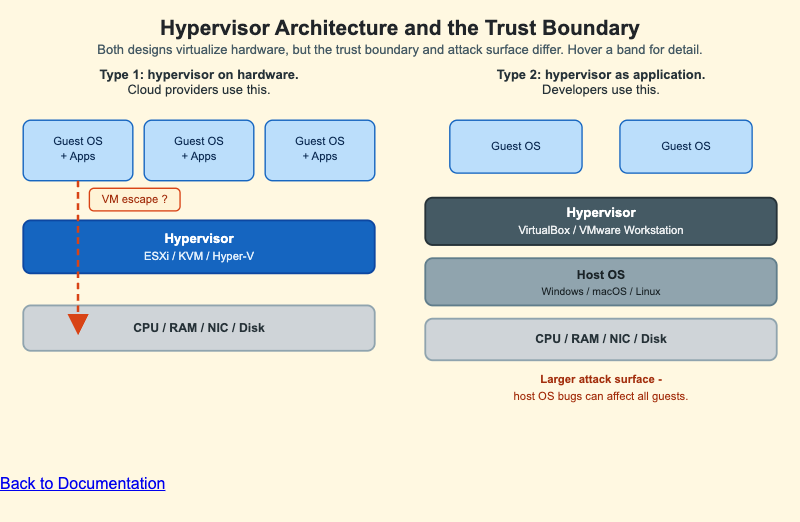
This diagram places the two hypervisor architectures side by side so you can see exactly where the trust boundary sits in each. The left stack is Type 1 (bare metal): three guest VMs sit directly on a cybersecurity-blue hypervisor band, which runs straight on the hardware. Because the hypervisor is the only layer between the guests and the metal, its trusted computing base is small — this is the design cloud providers use. A red dashed VM-escape arrow runs from a guest down through the hypervisor to the hardware, marking the central threat the design must mitigate: a compromised guest breaking isolation.
The right stack is Type 2 (hosted): two guest VMs sit on a slate hypervisor band that is just an ordinary application running on a full host OS, which in turn sits on the hardware. That extra host OS layer is the point of the comparison — any bug in the host OS can affect every guest, so the attack surface is larger. This is the design developers use on their laptops. Hover (or tap on a tablet) any band to read a short explanation of its role. The two stacks reflow into a single column on narrow screens.
Lesson Plan
Learning objective (Bloom: Understand): Students will distinguish Type 1 from Type 2 hypervisors and explain why the Type 2 host OS layer enlarges the attack surface.
Suggested classroom use: Display both stacks and ask students to trace, in each design, every layer that must be trusted for a VM to stay isolated. Hover the hypervisor bands to compare the trusted computing base, then discuss the red VM-escape arrow and why it is the headline threat for multi-tenant cloud.
Discussion questions:
- Why do cloud providers prefer Type 1 even though Type 2 is easier to install?
- In the Type 2 stack, name two layers whose compromise would affect all guests. Why does Type 1 have fewer such layers?
- What is a "VM escape," and which boundary does it violate?
References
- Wikipedia: Hypervisor — definition and the Type 1 vs Type 2 distinction.
- Wikipedia: Virtual machine escape — the central threat shown by the red arrow.
- Wikipedia: Trusted computing base — why a smaller TCB is easier to secure.
- NIST SP 800-125: Guide to Security for Full Virtualization Technologies — federal guidance on hypervisor security.
Specification
The full specification below is extracted from Chapter 10: "System Security: OS, Memory, and Access Control".
Type: drawing
**sim-id:** hypervisor-architecture
**Library:** Static SVG

Two stacks side by side. Left (Type 1, bare metal): three "Guest OS + Apps" VM
boxes over a cybersecurity-blue "Hypervisor (ESXi / KVM / Hyper-V)" band over a
gray hardware band, with a red dashed "VM escape" arrow from a VM down through
the hypervisor to the hardware. Right (Type 2, hosted): two "Guest OS" boxes over
a slate "Hypervisor (VirtualBox / VMware Workstation)" band over a wider "Host OS"
band over a gray hardware band, annotated "larger attack surface." Captions above
each stack. Responsive: side-by-side above 800px, stacked below.