CIA Triad with Example Threats and Controls
Run the CIA Triad Overview Fullscreen
You can include this MicroSim on your own website with the following iframe:
<iframe src="https://dmccreary.github.io/cybersecurity/sims/cia-triad-overview/main.html" height="600" width="100%" scrolling="no"></iframe>
About this MicroSim
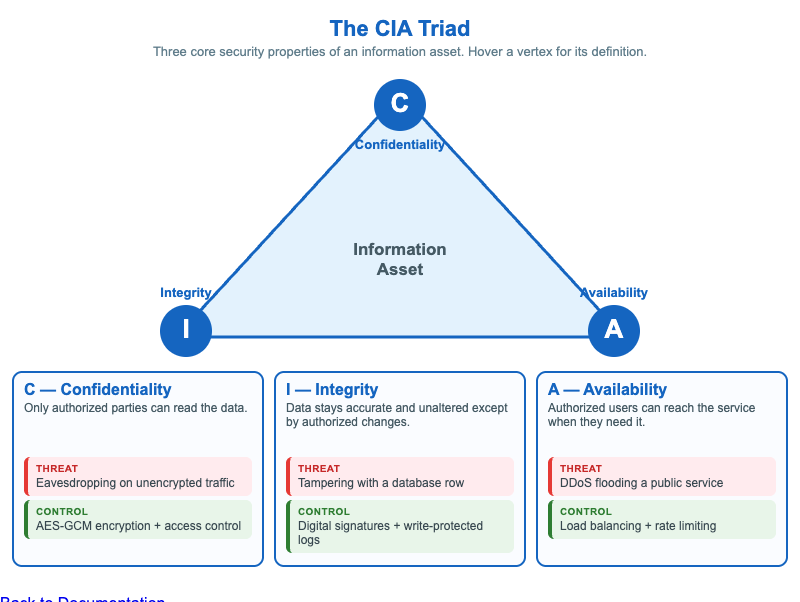
This infographic introduces the CIA triad — the three properties that almost every security decision protects: Confidentiality, Integrity, and Availability. The triangle shows the three properties as vertices around a central Information Asset, and hovering (or tapping) any vertex reveals a one-line definition of that property.
Beneath the triangle, each property gets its own card pairing a concrete threat (red) that violates it with a control (green) that supports it: Confidentiality is threatened by eavesdropping and supported by AES-GCM encryption and access control; Integrity is threatened by tampering and supported by digital signatures and write-protected logs; Availability is threatened by DDoS and supported by load balancing and rate limiting. The threat/control pairing helps students move from naming the properties to reasoning about how each is attacked and defended. The layout reflows to a single stacked column on narrow screens.
Lesson Plan
Learning objective (Bloom — Understand): Students can describe the three CIA properties and match an example threat and control to the property each affects.
Suggested classroom use: Open with the triangle and define each vertex by hovering. Then walk the three cards and ask students whether each listed control prevents, detects, or recovers from its paired threat. Use the central "Information Asset" to stress that all three properties protect the same thing from different angles.
Discussion questions:
- A ransomware incident encrypts a hospital's records. Which CIA properties does it violate, and in what order?
- The controls listed are examples, not a complete set. What is one more control you would add for each property?
- Why is it useful to think in terms of properties (C, I, A) rather than just "is it secure?"
References
- Information security — CIA triad (Wikipedia)
- NIST glossary: Confidentiality, Integrity, Availability
- NIST SP 800-12 Rev. 1 — An Introduction to Information Security
Specification
The full specification below is extracted from Chapter 1: "Security Foundations: Properties, Mindset, and Risk".
Type: infographic-svg
**sim-id:** cia-triad-overview<br/>
**Library:** Mermaid (or static SVG)<br/>
**Status:** Specified

A triangle with the three letters C, I, A at the vertices. Each vertex is labeled with the property name (Confidentiality, Integrity, Availability) and shows two columns beneath the label:

- **Threats column** (red): one threat that violates this property
  - C: "Eavesdropping on unencrypted traffic"
  - I: "Tampering with a database row"
  - A: "DDoS flooding a public service"
- **Controls column** (green): one control that supports this property
  - C: "AES-GCM encryption + access control"
  - I: "Digital signatures + write-protected logs"
  - A: "Load balancing + rate limiting"

Center of the triangle: the words "Information Asset". Hover/click on each vertex reveals a short definition tooltip. Color: cybersecurity blue (#1565c0) for the triangle, white background, slate-steel text. Responsive design that reflows to a vertical stacked list below 600px viewport width.

Implementation: Static SVG generated at build time, or a small Mermaid graph. No interactivity needed beyond hover tooltips.