Classic DMZ Architecture
You can embed this MicroSim in your own course page with the following iframe:
<iframe src="https://dmccreary.github.io/cybersecurity/sims/classic-dmz-architecture/main.html"
        width="100%" height="480" scrolling="no"></iframe>
About this MicroSim
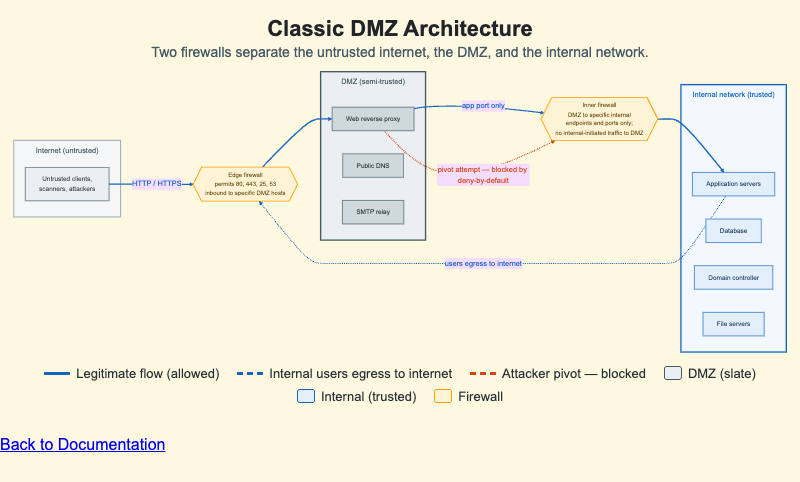
This diagram lays out the classic two-firewall DMZ ("screened subnet") design as a left-to-right flow through three trust zones. On the left is the untrusted internet — clients, scanners, and attackers. In the middle is the DMZ, a semi-trusted zone drawn with a slate border that houses the only hosts the public is allowed to reach: a web reverse proxy, public DNS, and an SMTP relay. On the right is the trusted internal network, drawn with a cybersecurity-blue border, holding application servers, the database, the domain controller, and file servers.
Two firewalls sit between the zones. The edge firewall permits only ports 80, 443, 25, and 53 inbound to specific DMZ hosts. The inner firewall lets the DMZ initiate connections only to specific internal endpoints on specific ports and blocks any internally initiated traffic back to the DMZ. Blue arrows trace the legitimate flows; a dashed blue arrow shows internal users reaching the internet through the edge firewall rather than through the DMZ. The red dashed arrow shows an attacker who has compromised a DMZ host attempting to pivot inward — and being stopped by the inner firewall's deny-by-default policy. Use the color legend below the diagram to read the flows. The diagram scales to its container width.
Lesson Plan
Learning objective (Bloom: Understand): Students will explain why a two-firewall DMZ with deny-by-default policies limits the blast radius of a compromised public-facing host.
Suggested classroom use: Display the diagram and trace the legitimate path of a web request from the internet to an application server, naming the firewall rule that allows each hop. Then point to the red arrow and ask students to explain, in their own words, why the inner firewall stops the pivot even though the DMZ host is fully compromised.
Discussion questions:
- If an attacker fully owns the web reverse proxy, what can they still not reach, and which control prevents it?
- Why is "no internal-initiated traffic to the DMZ" an important rule, not just "no DMZ-initiated traffic to internal"?
- The internal users' egress to the internet does not pass through the DMZ. Why is routing user web traffic around the DMZ a sensible design choice?
References
- Wikipedia: DMZ (computing) — the screened-subnet network design shown here.
- Wikipedia: Firewall (computing) — how packet-filtering policies permit or deny flows.
- NIST SP 800-41 Rev. 1: Guidelines on Firewalls and Firewall Policy — federal guidance on firewall and DMZ design.
- Wikipedia: Defense in depth (computing) — the layered-control principle the inner firewall embodies.
Specification
The full specification below is extracted from Chapter 8: "Network Security Foundations: Protocols, Firewalls, and Detection".
Type: diagram
**sim-id:** classic-dmz-architecture
**Library:** Mermaid

A horizontal flow with three boxed zones: Internet (untrusted, gray), DMZ
(slate-bordered, with web reverse proxy / public DNS / SMTP relay), and Internal
network (cybersecurity-blue-bordered, with app servers / database / domain
controller / file servers). An edge firewall (ports 80, 443, 25, 53 inbound) sits
between Internet and DMZ; an inner firewall (DMZ to specific internal endpoints
only; no internal-initiated traffic to DMZ) sits between DMZ and Internal.
Legitimate flows are blue; a red dashed arrow shows a blocked attacker pivot from
a compromised DMZ host. Responsive; scales to container width.