Vulnerability Sandbox MicroSim
You can include this MicroSim on your own page with the following iframe:
<iframe src="https://dmccreary.github.io/cybersecurity/sims/vuln-sandbox/main.html" height="562" width="100%" scrolling="no"></iframe>
About this MicroSim
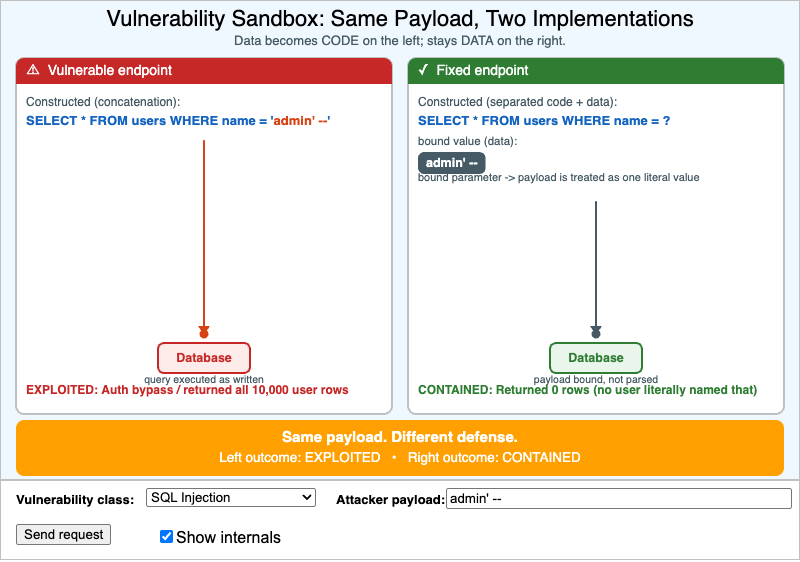
This MicroSim is a side-by-side vulnerability sandbox. You pick a vulnerability class, type (or accept the default) an attacker payload, and press Send request. The exact same payload is sent to two implementations of the same web endpoint: a vulnerable one on the left and a fixed one on the right. The sandbox shows how each implementation constructs the query, command, or output, animates the payload flowing into the sink (Database, Shell, Browser, Filesystem, or Object store), and reports the outcome — EXPLOITED in red on the left, CONTAINED in green on the right.
The central lesson is structural, not cosmetic. On the vulnerable side, the
attacker's input is concatenated directly into the code (the rust-orange text),
so data becomes code — the ' OR ... becomes part of the SQL, the ; becomes a
new shell command, the <script> becomes real script. On the fixed side, the
code (cybersecurity blue) and the payload (slate-steel data chip) are kept
separate: a bound parameter, an argument array, contextual escaping, a confined
file path, or an ownership check. The payload is the same; only the structure
changed — and that structural change is what makes the bad outcome impossible
rather than merely unlikely. Toggle Show internals to compare the constructed
strings directly, and switch classes to see that SQLi, command injection, XSS, path
traversal, and IDOR are variations on the same data-as-code mistake.
Lesson Plan
Learning objective (Bloom: Analyze). Given the same attacker payload, students will compare a vulnerable and a fixed implementation of a web endpoint, identify the structural difference (data concatenated into code vs. data kept separate), and reason about why the fix makes the bad outcome impossible.
Suggested classroom use. For each vulnerability class, have students predict both outcomes before pressing Send, then check against the sandbox. Emphasize that the attacker payload is identical on both sides — what changed is whether the system ever lets data cross into the code path. Use the "Show internals" toggle to make the concatenation (left) versus separation (right) visible side by side.
Discussion questions:
- The fix for SQL injection (bound parameters), command injection (argument arrays), and XSS (contextual escaping) all look different. What single principle do they share?
- Why is blocking specific "bad" characters (a denylist) a weaker defense than parameterization? Give a payload that a naive denylist would miss.
- IDOR has no special characters at all — the payload is just a valid ID. Why does it still belong in this sandbox, and what is the structural fix?
References
Specification
The full specification below is extracted from Chapter 5: "Software Vulnerabilities and Secure Coding".
Type: microsim
**sim-id:** vuln-sandbox
**Library:** p5.js
**Status:** Specified

Learning objective (Bloom: Analyze): Given the same attacker payload, the student
compares the behavior of a vulnerable and a fixed implementation of a web endpoint,
identifies the structural difference, and reasons about why the fix makes the bad
outcome impossible.

Canvas layout: two side-by-side simulated server panels (vulnerable on the left,
fixed on the right), an outcome display bar, and a control region.

Controls (p5.js built-in): a Select for "Vulnerability class" (SQL Injection,
Command Injection, Reflected XSS, Path Traversal, IDOR); an Input text field for the
attacker payload (auto-fills per class); a "Send request" button; a "Show internals"
checkbox.

Vulnerable panel: constructed query as a concatenated string with the payload
highlighted in rust orange; flows into a sink icon; exploit outcome in red.
Fixed panel: parameterized query / argument array / contextually escaped output;
payload shown as data, code in blue and data in slate steel; outcome in green.
Outcome bar: "Same payload. Different defense."

Default state: SQL Injection, payload admin' --, both panels visible, internals shown.
Resize behavior: updateCanvasSize() first in setup(); panels stack vertically when narrow.
Color palette: blue safe code, rust orange attacker payload, slate steel data,
amber warning, green contained.

Implementation: p5.js sketch with canvas.parent(document.querySelector('main'))
and updateCanvasSize() as the first call in setup().