The Security Program at a Glance
You can include this MicroSim on your own page with the following iframe:
<iframe src="https://dmccreary.github.io/cybersecurity/sims/security-program-layers/main.html" height="537" width="100%" scrolling="no"></iframe>
About this MicroSim
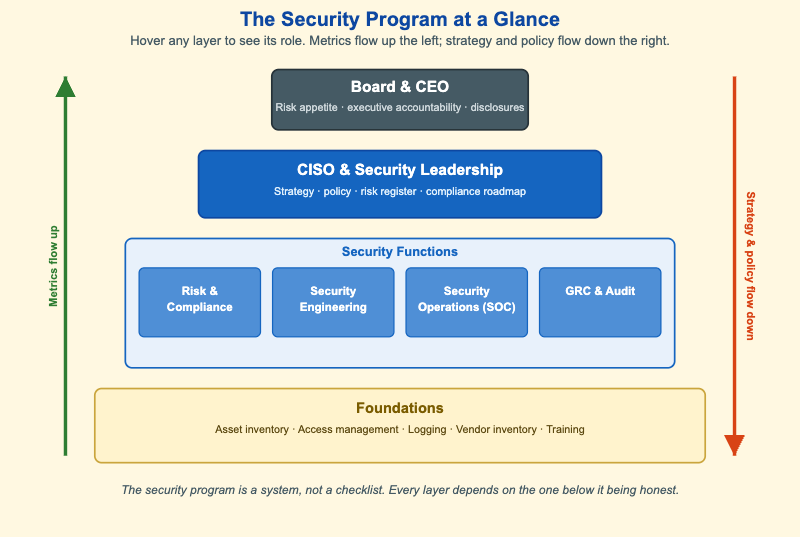
This diagram shows an organizational security program as a four-layer stack, drawn narrowest at the top and widest at the bottom to reflect how each layer rests on the one below it. At the top, the Board & CEO set the risk appetite, receive the metrics, and own public disclosures. Below them, the CISO & Security Leadership own the program itself — they translate technical risk into board-readable decisions through strategy, policy, the risk register, and the compliance roadmap.
The third layer holds the four Security Functions that do the day-to-day work: Risk & Compliance, Security Engineering, Security Operations (the SOC), and GRC & Audit. The widest band at the bottom is the Foundations — asset inventory, access management, logging, vendor inventory, and training. These are unglamorous, and they are exactly what every layer above silently assumes is in place.
Two arrows run alongside the stack. The green arrow on the left, Metrics flow up, carries coverage, incident counts, and audit findings toward leadership. The orange arrow on the right, Strategy & policy flow down, turns risk appetite at the top into concrete baselines at the bottom. Hover (or tap) any layer or arrow to read its role. The caption states the central idea: a security program is a system, not a checklist, and every layer depends on the one below it being honest.
Lesson Plan
Learning objective (Bloom: Understand). Students will identify the four layers of a security program and who owns each, and explain how metrics flow up while strategy and policy flow down.
Suggested classroom use. Project the diagram and read out a list of mixed activities — "approve the cyber-insurance budget," "patch the web servers," "decide how much breach risk the company will tolerate," "write the incident-response runbook." For each, have students name the owning layer and say whether it is an up-flow (a metric/report) or a down-flow (a directive/policy).
Discussion questions:
- Why is the Foundations layer drawn as the widest band? What happens to the SOC if the asset inventory is incomplete?
- The board does not run controls — it sets appetite and receives metrics. Why is that separation healthy rather than a sign of disengagement?
- Give an example of a metric that should flow up and a policy that should flow down. What goes wrong if the up-flow is dishonest?
References
- Chief information security officer — Wikipedia
- Governance, risk management, and compliance — Wikipedia
- Information security operations center — Wikipedia
- Risk appetite — Wikipedia
Specification
The full specification below is extracted from Chapter 13: "Organizational Security: Governance, Risk, and Compliance".
Type: infographic-svg
**sim-id:** security-program-layers
**Library:** Static SVG with hover tooltips
**Status:** Specified

A four-layer stacked diagram, top to bottom:

1. Top layer - Board and CEO (slate steel, narrowest band): "Risk appetite, executive accountability, public disclosures."
2. Second layer - CISO and Security Leadership (cybersecurity blue): "Strategy, policy, risk register, compliance roadmap."
3. Third layer - Security Functions (lighter blue, wider band): four side-by-side boxes labeled "Risk & Compliance", "Security Engineering", "Security Operations (SOC)", "GRC & Audit".
4. Fourth layer - Foundations (cream, widest band): "Asset inventory, Access management, Logging, Vendor inventory, Training".

A vertical arrow on the left labeled "Metrics flow up" runs from the foundations to the board layer.
A vertical arrow on the right labeled "Strategy & policy flow down" runs from the board layer to the foundations.

Caption beneath: "The security program is a system, not a checklist. Every layer depends on the one below it being honest."

Responsive: SVG scales with container; below 600px, the third layer's four boxes stack vertically.

Implementation: Inline SVG with tooltips and a small resize handler.