Authentication Mechanism Strength Comparison
You can include this MicroSim on your own page with the following iframe:
<iframe src="https://dmccreary.github.io/cybersecurity/sims/auth-mechanism-comparison/main.html" height="562" width="100%" scrolling="no"></iframe>
About this MicroSim
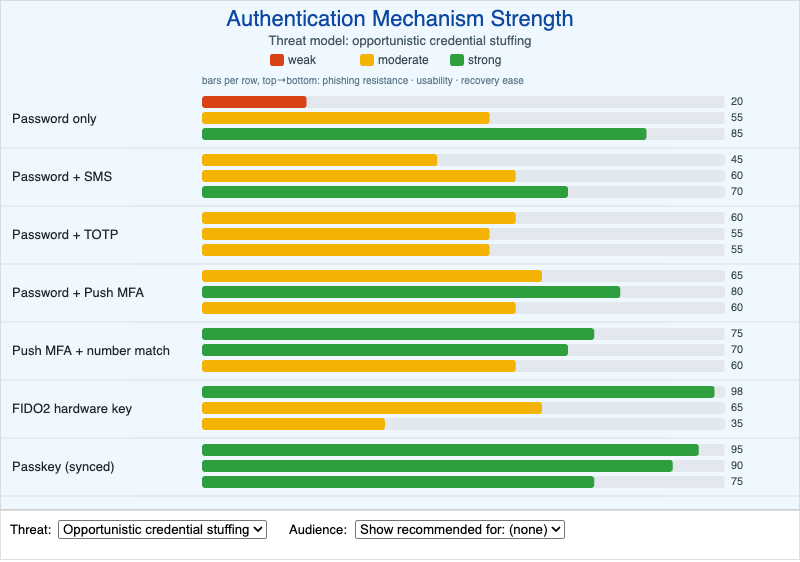
This infographic ranks seven authentication mechanisms — from a bare password up to synced passkeys — on three criteria shown as horizontal bars: phishing resistance, usability, and account-recovery ease. Bars use a traffic-light scale, so green is strong and red is weak on each axis.
The key insight is that not all second factors are equal under all threats. The Threat dropdown switches between opportunistic credential stuffing (bulk, automated attacks) and targeted spear-phishing (a patient attacker aiming at one person). Watch the phishing-resistance bars collapse for SMS, TOTP, and push under the spear-phishing model, while FIDO2 and passkeys barely move — because they bind the credential to the site's origin, so a relay proxy cannot reuse it.
The Audience dropdown highlights which mechanisms are typically recommended for consumers, enterprise, or high-value accounts. Hover any row to read a one-paragraph summary of that mechanism's strengths, weaknesses, and a representative deployment story. The canvas is width-responsive.
Lesson Plan
Learning objective (Bloom: Evaluate). Students will judge the appropriate authentication mechanism for a given threat model and user population, and justify the choice using phishing resistance, usability, and recovery cost as criteria.
Suggested classroom use. Give each group a scenario — a consumer email provider, a hospital EHR, a cryptocurrency exchange admin — and have them pick a mechanism. Require them to switch the Threat dropdown to spear-phishing before committing, and to defend the recovery trade-off they accept.
Discussion questions:
- Why does the phishing-resistance bar for "Password + TOTP" drop so much under the spear-phishing model, while "FIDO2 hardware key" stays high?
- Passkeys score high on both usability and phishing resistance. What is the trade-off you are accepting in exchange?
- For a population that frequently loses devices, which axis should weigh most heavily, and which mechanism best balances it against phishing resistance?
References
- Multi-factor authentication — Wikipedia
- FIDO2 / WebAuthn — Wikipedia
- Phishing — Wikipedia
- Credential stuffing — Wikipedia
Specification
The full specification below is extracted from Chapter 12: "Human Security: Identity, Authentication, and Social Engineering".
Type: interactive-infographic
sim-id: auth-mechanism-comparison
Library: p5.js
Status: Specified

A horizontal bar-chart-style infographic with seven authentication mechanisms
(rows): Password only, Password + SMS, Password + TOTP, Password + Push MFA,
Password + Push MFA with number match, FIDO2 hardware key, Passkey (synced).

For each row, three colored bars (segments) show: phishing resistance, usability,
and account-recovery ease, on a traffic-light scale.

Hovering on a row reveals a tooltip with a one-paragraph summary of the
mechanism's strengths, weaknesses, and a representative deployment story.

Controls:
- Toggle: "Threat model" — switches between opportunistic credential stuffing and
  targeted spear-phishing; bar values update.
- Toggle: "Show recommended for: consumers / enterprise / high-value accounts."

Learning objective (Bloom level: Evaluating): Students judge the appropriate
authentication mechanism for a given threat model and user population.

Canvas: 800x500 default, responsive. Cybersecurity blue primary, slate borders,
traffic-light red/yellow/green for the strength bars.

Implementation: p5.js with hover-detection on row regions; data driven by a small
JS object. updateCanvasSize() called first in setup().