Coverage-Guided Fuzzer Loop
You can embed this MicroSim in your own course page with the following iframe:
<iframe src="https://dmccreary.github.io/cybersecurity/sims/fuzzer-coverage-loop/main.html"
        width="100%" height="592" scrolling="no"></iframe>
About this MicroSim
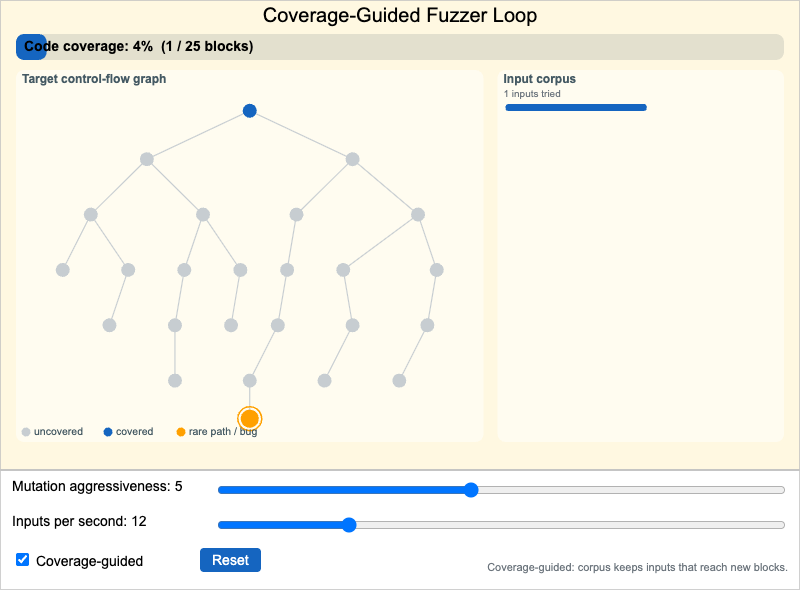
This simulation shows the inner loop of a coverage-guided fuzzer. The left panel is a stylized control-flow graph of a target function — about two dozen basic blocks arranged as a branching tree. Blocks start gray (never executed) and fade to cybersecurity blue as inputs reach them. A handful of deep, rarely reached blocks are amber; the deepest one is the bug. The right panel is the input corpus: each input the fuzzer tries appears as a horizontal bar whose length is its size. Inputs that reached a previously uncovered block are highlighted in blue; inputs that added nothing are dim gray. A coverage gauge across the top tracks the percentage of basic blocks reached in real time.
Hover the canvas to run the loop. Each tick the fuzzer mutates an input and "executes" it through the graph; an amber token animates along the path it takes. The Mutation aggressiveness slider controls how boldly inputs are mutated and Inputs per second controls the speed. The key control is the Coverage-guided checkbox. With it on, the fuzzer keeps inputs that reach new blocks and builds on them, so coverage climbs steadily and the deep amber bug block is eventually reached — triggering a CRASH animation. Turn it off and the fuzzer reverts to pure random fuzzing: shallow blocks still get hit, but the deep, guarded paths are almost never reached, so the bug stays hidden. Use Reset to start a fresh run and compare the two modes.
Lesson Plan
Learning objective (Bloom: Analyze): Students will compare the exploration behavior of coverage-guided versus random fuzzing and explain why coverage guidance dramatically reduces the time to find bugs on deep code paths.
Suggested classroom use: Run the simulation in coverage-guided mode and note roughly how long until the CRASH appears and what the coverage percentage reaches. Reset, turn the checkbox off, and run random mode for the same time. Have students record both coverage curves and articulate why the deep block behaves so differently between the two modes.
Discussion questions:
- Why does keeping inputs that reach new blocks make later inputs more likely to reach even deeper blocks?
- In random mode, increasing mutation aggressiveness helps a little but not much. Why can't aggressiveness alone substitute for coverage guidance?
- The bug lives behind a rare, guarded branch. What real-world code patterns create blocks like that?
References
- Wikipedia: Fuzzing — overview of fuzz testing, including coverage-guided fuzzers.
- AFL (American Fuzzy Lop) — the influential coverage-guided fuzzer this model is inspired by.
- Wikipedia: Code coverage — the metric the fuzzer optimizes for.
- libFuzzer documentation — an in-process, coverage-guided fuzzing engine.
Specification
The full specification below is extracted from Chapter 6: "Software Assurance and Supply Chain Security".
Type: microsim
**sim-id:** fuzzer-coverage-loop
**Library:** p5.js

A p5.js MicroSim visualizing how a coverage-guided fuzzer explores a target
program's code paths over time. Left panel: a control-flow graph of ~25 basic
blocks (gray uncovered, blue covered, amber rare/bug). Right panel: a vertical
input corpus where coverage-gaining inputs are highlighted. Top: a real-time
coverage gauge. Controls: Mutation aggressiveness (1-10), Inputs per second
(1-50), Coverage-guided checkbox (off = pure random for comparison), Reset.
Coverage-guided mode reaches the amber bug block and plays a CRASH animation;
random mode almost never does. Bloom: Analyze.