SBOM as a Dependency Tree Explorer
You can include this MicroSim on your own page with the following iframe:
<iframe src="https://dmccreary.github.io/cybersecurity/sims/sbom-dependency-explorer/main.html" height="602" width="100%" scrolling="no"></iframe>
About this MicroSim
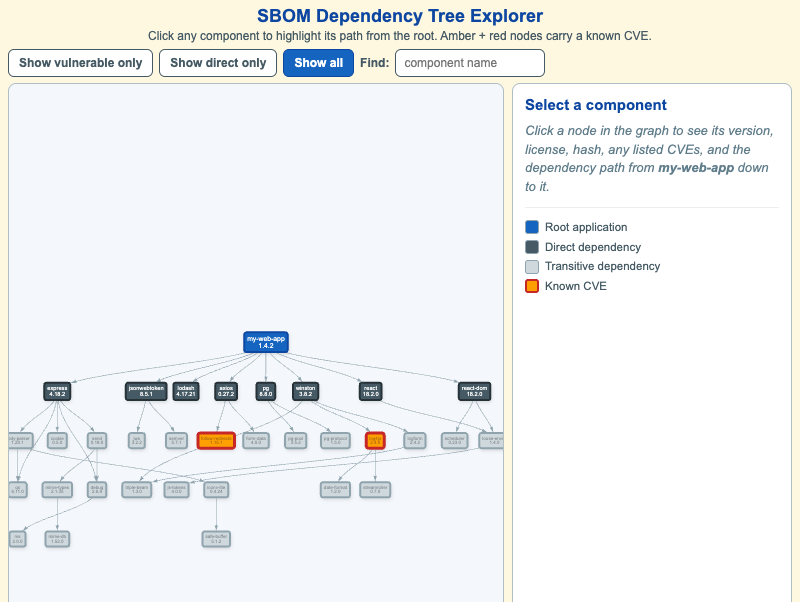
This MicroSim renders a small-but-realistic Software Bill of Materials (SBOM)
for an application called my-web-app v1.4.2 as an interactive dependency graph.
The root application sits at the top in cybersecurity blue. Below it are eight
direct dependencies in slate steel — the packages the team explicitly chose
(express, jsonwebtoken, lodash, axios, pg, winston, react,
react-dom). Below those are roughly twenty-five transitive dependencies in
light gray — the packages those dependencies pulled in, often without anyone on
the team ever noticing.
Two components are deliberately marked as vulnerable (amber fill, red border):
log4js@2.4.0 (CVE-2018-21010, world-readable log files) and follow-redirects
(CVE-2023-26159, header leakage across redirects). Notice that neither is a direct
dependency — both arrived transitively, which is exactly why supply-chain risk is
so easy to miss.
Click any node to highlight its path from the root and read its version,
license, truncated hash, and any listed CVEs in the side panel. Use Show
vulnerable only to collapse the graph to just the components on a root-to-CVE
path, Show direct only to see what the team actually installed, and the
Find box to jump to a component by name. The data is loaded from a local
data.json in CycloneDX format, the same machine-readable structure real SBOM
tooling produces.
Lesson Plan
Learning objective (Bloom: Apply). Given a published CVE in a transitive dependency, students will locate the affected component in an SBOM and identify the dependency path from the root application to the vulnerable component.
Suggested classroom use. Announce a CVE ("a new advisory just dropped for
log4js 2.x"). Have students use Find to locate it, then click it and read
off the path-from-root breadcrumb. Ask which direct dependency is responsible for
pulling it in. Then switch to Show direct only and ask whether the team could
have known about the risk by reading their own package.json — the answer is no,
and that is the whole point of an SBOM.
Discussion questions:
- Why does an SBOM list transitive dependencies and not just the packages the team chose to install? What attack would you miss without them?
log4js@2.4.0is three layers deep. Who is responsible for upgrading it — the application team, or the maintainer of the dependency that pulled it in?- The "Show vulnerable only" view hides most of the tree. In an incident, why is collapsing to the root-to-CVE path more useful than seeing the whole graph?
References
- Software supply chain — Wikipedia
- CycloneDX (SBOM standard)
- Common Vulnerabilities and Exposures (CVE) — Wikipedia
- Transitive dependency — Wikipedia
Specification
The full specification below is extracted from Chapter 6: "Software Assurance and Supply Chain Security".
Type: graph-data-model
**sim-id:** sbom-dependency-explorer
**Library:** vis-network
**Status:** Specified

An interactive graph visualization of a small-but-realistic application SBOM, rendered with vis-network in a responsive container (default 800x500, resizes on window resize).

Nodes (about 35 total):

- Root application (cybersecurity blue #1565c0, large): my-web-app v1.4.2
- Direct dependencies (slate steel #455a64, medium): ~8 nodes (express, jsonwebtoken, lodash, axios, pg, winston, react, react-dom)
- Transitive dependencies (light gray, small): ~25 nodes including a deliberately included log4js@2.4.0 as a known-vulnerable example
- Vulnerable nodes (amber #ffa000 with red border): 2-3 nodes, each tagged with a CVE label visible on hover
- Edges: directed, from dependent to dependency

Controls:

- Filter: "Show vulnerable only" - hides any node not reachable from the root through a vulnerable node
- Filter: "Show direct only" - hides transitive dependencies
- Highlight path: click any node to highlight the full transitive path from root
- Search box: find a component by name (allow-list filtered to alphanumerics)

Side panel:

- Selected component name, version, license, hash (truncated)
- "Listed CVEs" with severity badge
- "Path from root" as an arrow-separated breadcrumb

Learning objective (Bloom - Apply): given a published CVE in a transitive dependency, locate the affected component in an SBOM and identify the path from the root application to the vulnerable component.

Responsive: side panel collapses below the network below 700px viewport.

Implementation: vis-network for the graph, vanilla JS for the side panel, fetch from a local data.json containing the SBOM in CycloneDX format.